Category Archives: Uncategorized

Video from SF Startup EDU Weekend

Back in June, I went to a Startup Weekend (sfedu.startupweekend.org/​) event at Grockit (www.grcokit.com) headquarters in San Francisco when about 80 people spent a weekend developing ideas for a startup. I pitched the notion of an App Store and working with Roby John from Taptolearn, Aamir Poonawalla we kind of hacked up a cool IMS LTI launch to an iPhone app (video below).

They made a really cool promotional video for the weekend here:


Here is our demo video (no audio):


A Summer Month of Code – Learning Tools Interoperability in Sakai

I am really pleased with the new Basic LTI and IMS Common Cartridge 1.1 support in Sakai 2.9. If you want to skip the boring detail below – just watch this video and send it to your friends:


http://vimeo.com/27113903

Here is the back story.

Back on July 2, I decided to build a whole new capability to support Basic LTI and IMS Common Cartridge 1.1 in Sakai. I kicked it off with the following blog post:

Coming Back Home to Sakai 2.9 (July 2)

I talk about how Sakai started out with the first shipping support for IMS Basic LTI over two years ago, but the support from the other vendors had matured very nicely and our support was looking a little oversimplified and creaky. With my desire for Sakai 2.9 to be a nice, fresh relaunch of Sakai with its new Portal and Rutger’s Lesson Builder, it seemed a perfect time to dive into building a state-of-the-art Basic LTI support for Sakai and prepare Sakai to support additional new LTI features coming from the IMS LTI working group thanks to Lance Neumann of Blackboard and Greg McFall of Pearson.

I had a deadline of August 1 because Chuck Hedrick and Eric Jeney of Rutgers were madly working on improving Lesson Builder for a Fall rollout at Rutgers and inclusion in the Sakai 2.9 release. Chuck built IMS Common Cartridge 1.0 support and all of IMS CC 1.1 support except the Basic LTI part. Without Basic LTI support in Lesson Builder, we could not claim compliance to IMS CC 1.1.

So I needed to build a new capability for Sakai, plug it into Site Info, build a new administrator tool, and then plug it all into Lesson Builder’s authoring environment and import code. And it all had to be done by August 1 to give Chuck enough time to test it for production at Rutgers.

This resulted in a sprint for the past four weeks while I coded on planes, in my home office, on a camping trip, at the joint Sakai/Jasig meeting in New York, during cab rides to and from airports, during the Blackboard Developer conference. You can even see a mess up at the end of my recorded BBDevCon presentation because I forgot to test a demo that John Fontaine and I were doing because I was coding on the new Sakai features right up until five minutes before my talk. It was a 24×7 code sprint for four weeks.

Here is my presentation at BbDevCon11 – the disaster is towards the end. It all finally worked and the source of the problem was filtering of port 8080 – but it had me flustered for a while thinking all Sakai servers in the world were down. You can hear Fontaine in the background giving me a good-natured ribbing as I struggled to find a Sakai server that worked. I eventually just did the launch of CourseSites from Michigan’s CTools production server (because it did not use port 8080):

IMS Standards at BbDevCon11

You can also see a demo of the Fontaine/Severance hack wthout a disaster in the middle here:

http://vimeo.com/26310497

I do need to apologize to everyone who I interacted with during July if I seemed distracted and itchy to get back to my laptop. I was not just writing code, I was also building a UI and persistence framework and then using that framework to build my tools.

What We Accomplished

I am mixing the work of Chuck and Eric with my own work.

  • Built a new “External Tools” extension to Site Info that lets you manage your tool installations (Full LTI coming soon) as well as make tool configurations. These tool configurations have URLs that can be used elsewhere in Sakai like in Resources, Wiki, Melete, anywhere that you can put a URL. You can spread the URLs around and still manage all the tools (change keys settings, etc) from one central location in Site Info.
  • Added a new tool for System Administrators to monitor usage of external tools across the system, and reach in and tweak settings on a tool installation or a tool configuration. They can create site-wide tool installations that appear in all sites.
  • Lesson Builder now has the ability to install, configure and launch external tools right from within the Lesson Builder UI as another resource type. In particular, instructors can set per page values for LTI launches like custom parameters very easily.
  • Lesson Builder imports Basic LTI items from IMS 1.1 Common Cartridges. Since cartridges do not have keys and secrets, the import either hooks the imported items to an existing installed tool with a key and a secret or makes a new tool with an un-configured key and secret. There are several workflows for getting a key / secret set on a tool ranging from using the Administrator tool, Site Info, or even when an instructor launches a partially configured tool. The flow was designed to make it as natural for the instructor as possible.

Everything is working and demonstrated in the above video. I am sure that there are little rough edges with our flows and screens UI wise and we can tweak those as more people look at the code (now sitting in the trunk of Lesson Builder, Site Info, and Basic LTI). We are very much open to suggestions as folks review the work. But hurry because code freezes are coming up quickly.

Technical Details

First, I had to decide on which display technology and persistence to use to build my new tool in Sakai. My preference for a new tool is by far to build a JSR-168 portlet using JSP and JSTL as the presentation layer. My Basic LTI portlet avoided the persistence problem by using Sakai’s Placement properties. But this tool needed to be a frame-based helper because it needed to work with Site Info and Lesson Builder as a helper. So a portlet was not possible. Also since this needed lots of tools independent of a particular placement, I had to break down and make some database tables – so choosing a persistence layer was necessary for this project.

I don’t like heavy frameworks like JSF, RSF, and Wicket because they force tons of extra Java and XML just to print out “Hello World”. I was going to have a very complex data model and very dynamic UI because the administrator gets to control what fields (like popup and custom parameters) the instructor can configure on each LTI tool placement. I did not feel like encoding it all into a bunch of getters, setters, and bean properties, having to code everything 4-5 times when I wanted to change something.

So I decided to use Velocity augmented by my own presentation layer. I had built a really cool presentation layer when I wrote the Basic LTI code for ATutor where I made it really easy for myself to make a complex dynamic UI. I called that notion the “Form Oriented Object Relational Model”. I documented an early PHP version of FOORM in this blog post:

ATutor with Basic LTI is Released

I decided instead of writing thousands of lines of PHP to implement the views for ATutor, that I would make a library to build the HTML for the sets of fields I needed. This is also a bit of a riff on the way Moodle handles forms generically. Moodle provides a set of form handling routines that enforce consistency of look and feel and keep the details hidden behind an abstraction. It worked but was a little too chatty with too many lines needed for each form field. The Moodle model is similar to Glenn’s Ambrosia approach.

I took the opportunity to rewrite my FOORM code in Java and clean it up and make it work more generally.

FOORM Presentation and Persistance

In FOORM you build a model using an array of strings that look as follows;

  static String[] CONTENT_MODEL = { 
      "id:key", 
      "tool_id:integer:hidden=true",
      "SITE_ID:text:maxlength=99:label=bl_content_site_id:role=admin",
      "title:text:label=bl_content_title:required=true:maxlength=255",
      "frameheight:integer:label=bl_frameheight",
      "newpage:checkbox:label=bl_newpage",
      "debug:checkbox:label=bl_debug",
      "custom:textarea:label=bl_custom:rows=5:cols=25:maxlength=1024",
      "launch:url:hidden=true:maxlength=255",
      "xmlimport:text:hidden=true:maxlength=16384", 
      "created_at:autodate",
      "updated_at:autodate" };

This is kind of like a Rails model in colon-separated form. One thing that FOORM assumes is that you will be internationalizing your UI and so it even encodes the field labels..

You can build an input form with the following lines of code:

String formInput(Object previousData, String [] modelInfo, Object resourceLoader)

This returns a set of input tags, one for each field, repopulated from the previous data (can be Properties, Map<String,Object>, or ResultSet) and using the provided resource loader.

You embed the form tags in some Velocity as follows:

<form action="#toolForm("")" method="post" name="customizeForm" >
    $formInput
    <input type="hidden" name="sakai_csrf_token" value="$sakai_csrf_token" />  
   <input type="submit" accesskey ="s" class="active" name="$doAction" 
        value="$tlang.getString('gen.save')" />
   <input type="submit" accesskey ="x" name="$doCancel" 
        value="$tlang.getString('gen.cancel')" 
        onclick="location = '$sakai_ActionURL.setPanel("Content")';return false;">
</form>

There are utilities to validate incoming data, and extract it into the right objects and type for inserting into a database. with a very few lines of code. Here is an extract from request properties into newMapping and insert into the database:

    HashMap<String, Object> newMapping = new HashMap<String, Object>();

    String errors = foorm.formExtract(requestProperties, formModel, 
        rb, true, newMapping, null);
    if (errors != null) return errors;

    String[] insertInfo = foorm.insertForm(newMapping);
    String makeSql = "INSERT INTO " + table + " ( " + insertInfo[0] + 
          " ) VALUES ( " + insertInfo[1] + " )";
    final Object[] fields = foorm.getInsertObjects(newMapping);
    m_sql.dbInsert(null, sql, fields);

It supports a very REST-style property bag approach to data models except that all the fields are properly and fully realized as database columns so they can be searched, selected, grouped, and ordered with as sophisticated query as you want to create.

FOORM is designed to be extended so you have the generic Foorm and you extend it to make a SakaiFoorm that captures all the Sakai-specific rules for generating fields, handling internationalization, etc.

I even dispensed with the “CREATE TABLE” scripts – since Foorm knows the entire model, it can make the tables and sequences automatically. It know about the various rules for fields in MySql, HSQL, and Oracle. The AutoDDL code looks as follows:

 String[] sqls = foorm.formSqlTable("lti_content", 
     LTIService.CONTENT_MODEL, m_sql.getVendor(), doReset);
        for (String sql : sqls)
          if (m_sql.dbWriteFailQuiet(null, sql, null)) M_log.info(sql);

I could make this more succinct with an overridable method in Foorm. Foorm still needs to learn about changes to data models and automatically generate “ALTER TABLE” commands. I will write that code when I need to do a conversion when I release a future version of DBLTIService is released and I need to expand the model.

I think that Foorm has a lot of potential. It is kind of a weird combination of a partial presentation layer and partial object relational mapper. It is focused on providing useful library utilities that let the developer get as tricky as they want, making sure that the nasty repetitive common tasks take as little effort as possible.

You can ask me “Why not Hibernate?” or “Why not Spring JDBC?” at a bar sometime. Be prepared to hear my voice raise a few notches as I rail about “Hibernate’s is an overbearing over-engineered steaming pile of…(oops did I say that out loud?)” or “Spring JDBC makes SQL portable in Java only to the level that they solve the trivial problems and punt on anything mildly interesting or complex…”. If I have had a few beers before the conversation starts, it will be more (or less) interesting.

Oh by the way, Foorm provides a nice, generic way to handle paged SQL queries. I still need to build advanced WHERE clauses, and support ORDER BY and GROUP BY operations.

This is why Foorm is still a prototype and I don’t want anyone else using it for a while. I feel that any library / framework should be used by its creator for a long time, solving lots of real-world problems before they claim to have anything truly reusable. But I figured I would show folks what I am thinking.

I have been experimenting with finding the right combination of power and convenience for both display layers and persistence. Before FOORM there was OMG-ORM (http://omg-software.com/) – it too was an exploration of the balance between powerful capabilities and intrusiveness as well as trying to make things intuitive. FOORM is much simpler than OMG and I find it more natural to use.

Summary

In short, it has been a heck of a month of pure code to the exclusion of nearly everything else. I built a UI framework and persistence layer and then built a tool on top of my new frameworks. Chuck Hedrick and Eric Jeney of Rutgers sprinted on Lesson Builder (pausing along the way to take the “Upload web site” code from Adrian Fish of Lancaster). And In the last few days, Chuck, Eric, and I spirited to connect it all together to make it so Lesson Builder has great, extensible Basic LTI support in both its authoring and import.

It means that Sakai 2.9 really catches up in many important ways to Blackboard, Desire2Learn, Learning Objects, Jenzabar, Instructure, and OLAT in their support of Basic LTI and Common Cartridge. Blackboard is still the only CC 1.1 exporter – so they have the lead on that one and I don’t think we will have that until next year sometime in Sakai. Export is hard to make import easy – my hat is off to Blackboard for making it work. Blackboard’s CC 1.1 export is why they were the first in the IMS ring of tattoos.

But for me export is lower priority than the next round of innovations for LTI coming from the IMS LTI Working Group led by Greg McFall of Pearson and Lance Newmann of Blackboard. This work is ready to pop and we should see some real progress on adding auto provisioning and run-time services to LTI implementations in the field. The spec leads have done a great job and the new Site Info work is ready to be extended to add these new features as we get the standards out the door.

It might be a good time to start to watch IMS closely. You only have a few more days to make the IMS meeting in Redmond, WA at Microsoft’s HQ. You have to pre-register – so hurry!

http://www.imsglobal.org/aug2011microsoft.cfm
Sakai 2.9 External Tool Support (IMS Basic LTI)

I just updated Sakai’s trunk to a new Basic LTI Administration tool. This tool is intended to be added to the !admin site and installs itself as an extention to Site Info.

It allows administrators and instructors to make Basic LTI Tools and Content Items. Each tool can have many content items. Content Items have Launch URLs that can be used anywhere within Sakai like Resources, the iFrame Tool, Melete, literally anywhere.

Here is the JIRA describing the changes: https://jira.sakaiproject.org/browse/BLTI-119

In particular, this lays a tool and service foundation for Lesson Builder to easily add an “Add External Tool” feature both for its authoring and when it is importing IMS Common Cartridges (version 1.1).

This also lays a foundation / starting point to add support for auto-provisioning capabilities for Full LTI.

This design is informed by the great work Basic LTI work in Moodle, ATutor, Blackboard, Desire2Learn, and Instructure’s Canvas. As more experience is gained in the use of BLTI in LMS systems, the UIs are starting to converge. I like the new terminology where we call these “External Tools” rather than “Basic LTI Tools”.

There is still work to be done and comments are welcome. I am trying to get it ready in time to fit it into Lesson Builder for 2.9.

Tech note to remember this command:

svn merge -r94350:HEAD https://source.sakaiproject.org/svn/basiclti/branches/SAK-20774

Comment: Why Fairy Dust?

I was reading a blog post about maching learning and fairy dust:

http://stdout.be/2011/07/18/machine-learning-fairy-dust/

It prompted me to make the following comment as I am a general critic of the “fairy dust” approach to problem solving. Of course – it is just a rant (one of my more light-hearted rants).

The problem is all wrapped up in how funding / opportunities are distributed. The folks with money who want to affect the future positively are generally not brilliant in any domain other than making money. So they consult “experts” as to what is the “next big awesome thing” – or as you put it, what is the “next fairy dust”. Once an expert convinces a person with the money of the veracity of the particular brand of dust – it becomes dogma. And those who want money salute the the “fairy dust” and make loud protestations as to the general amazingness of “fairy dust”. They also shout down “non-believers” to show their undying loyalty to the fairy dust. They give invited keynote speeches about the future of dust.

By doing these things, they get funding. And because they are funded – the market assumes they must be right because no one would fund a “bad idea”. Slowly public opposition to fairy dust goes underground until the funds are exhausted (usually having virtually no impact). Since everyone is so ashamed at the amount of waste in the name of “fairy dust”, no one ever goes back and checks who was wrong and where they went wrong. It is just easier for the “dust riders” to lay low for a while and then re-emerge to flow to the next source of funding “fairy dust”.

About: Tattoo

Jeff Longland made a post about Blackboard and mentioned my Tattoo:

http://jlongland.wordpress.com/2011/07/13/a-call-to-blackboard-openness/

Here is my comments.

Jeff – Interesting post. I do agree with your first point – I think that creating a more porous boundary between Blackboard and its community is in their best interest and will happen in time. I disagree with your second point somewhat. Simply calling for the release of source code is kind of pointless. Open Source is just a small part of an overall equation. Companies like Instructure do it from the beginning and that is good – but rest assured that there are plenty of bits that Instructure does not release. MoodleRooms has their secret sauce that does not get released. Simply getting your hands on a ZIP file with some Java code almost means nothing unless it is embedded in an open ecosystem. I am sure that the Atlassian release of their code was just a small step in an overall evolution of their culture that took many small steps. Releasing source is not a step function.

That said, I think that it would be a cool step forward if folks who had proprietary software had forums where they could share their production experiences, good and bad. One thing good about Sakai is that our warts are on display in public lists. When someone has a crisis, we all have it with them and learn together. I understand it is scary to let those kinds of conversations happen in the open – but it is also freeing after you get used to it.

In terms of the Tattoo – it is not just a “Blackboard” Tattoo – the Tatoo has a Sakai logo at the center circled by a ring of smaller Tatoos. The ring is a logo for each Commercial or Open Source LMS that releases a Certified Basic LTI 1.0 support in their core product (i.e. not a patch, building block or add on – part of the core code). I am staging the tattoos so my shoulder is not all healing at the same time. The first two tatoos were an IMS logo and a Blackboard logo. The next logos that will be added in the next few weeks are Desire2Learn, LearningObjects, OLAT, and Jenzabar. As best I know, Instructure has Basic LTI Consumer in their repository but no one has seen it in a release – and it is not yet certified. Also Moodle has a module (basiclti4moodle) but it is not in the core code base so Moodle is not yet eligible for a Tatoo. But we are hopeful Moodle will ship support for BLTI in 2.2 so they too will be on my shoulder.

If Moodle and Instructure release Basic LTI, that will complete my tattoo as there are 8 slots in the “ring of compliance”.

And then of course I will write another book and use that Tattoo as the cover of that next book.

http://www.dr-chuck.com/sakai-book/

You can see the Sakai Tattoo without Blackboard or IMS on the cover of my current book :)

You will never get anywhere if your first thought is, ‘Who will I blame if this goes wrong?’

I just came up with this saying this morning.

You will never get anywhere if your first thought is, ‘Who will I blame if this goes wrong?’

I don’t have much else to say – except perhaps buy my book about Sakai and Open Source.

http://www.dr-chuck.com/sakai-book/

This morning is mostly coding after I catch up on Twitter and Google+.

Coming Back Home: BasicLTI for Sakai 2.9 – SAK-20774

It is kind of weird. Over the past two years, I have been putting a lot of energy into IMS Basic Learning Tools Interoperability and even have a new series of tattoos that are about IMS BLTI that are healing as I write this blog post. It has been my focus for a long time.

I started out a long time ago writing a Tool for Sakai 2.7 and this was one of the early crop of Basic LTI tools that staked out the territory. I kept the Sakai tool simple and direct, trying to also make it a nice example of how to write a portlet inside of Sakai. Since BasicLTI uses iFrames internally it was really nice not to have to solve the iframe-within-an-iframe problem in Sakai.

I wish more folks would either build new tools or convert existing tools to be portlets in Sakai. The Basic LTI tool really worked the kinks out of JSR-168 support in Sakai.

Once I had the Sakai tool basically functional, I spent my time trying to get the market interested in Basic LTI.

The path led to Barcelona where Marc Alier, Jordi Piguillem Poch and Nikolas Galanis built a Moodle Module for 1.9.

The great folks at Desire2Learn put it into their release 7.4.2 and announced it at Educause in November 2009. That was a great leap forward.

Then I decided to work with the folks from OLAT at the University of Zurich and I build a OLAT Basic LTI tool and visited Zurich to get it integrated into OLAT 7.0.

Both Learning Objects and Jenzabar added Basic LTI to their LMS systems.

Then we invented the IMS Basic LTI Extensions to send grades back to the LMS and allow a full roster pull from the LMS over REST web services.

I went back and added the REST web services to Sakai 2.8 and we built them into Moodle 1.9 and then ported everything to Moodle 2.0 with a whole new user interface that dealt with these services.

All the while we were refining the user interface.

Then late last year I decided to add Basic LTI support to ATutor. It was fun to work with the ATutor team and since they had just implemented IMS Common Cartridge 1.1, ATutor’s internal structure was well suited for Basic LTI and we build what I think was the best UI for Basic LTI.

Then early this year Blackboard released Learn 9.1 Service Pack 4 with support for Basic LTI. Their UI had some clever innovative tweaks and gave the instructor and admin the ability to look at and monitor where the active links were happening and find broken links, etc – it was very cool.

Then about a month ago Marc, Jordi, Nikolas and I ended up in a sprint to try to make Basic LTI into the trunk of Moodle 2.1 – we missed it – but should make it into 2.2. As the Moodle Central team reviewed our code, the biggest gaping whole was the lack of suport for import/export. So we (mostly Nik with help from Jordi) came up with an awesome UI and workflow for import and thought it through very deeply.

Blackboard also supports import of IMS CC 1.1 so they have it thought through as well. Seeing the Blackboard 9.1 SP4 UI was helpful as was the long discussions about Full LTI with Greg McFall of Pearson and Lance Neuman of Balckboard in the IMS LTI Working group.

So, the Moodle Backup/Restore turned out pretty nicely I think.

And then as real large companies like MgGraw-Hill, Pearson, Cicso, K12.com started looking at Basic LTI – they found a few tweaks that are needed in the area of URL remapping and instructor access to custom parameters. Look for an updated Basic LTI 1.1 soon – if you are interested in seeing it early – you need to come to the working group as IMS does not publish specs until Public Draft phase.

And for me, I also spent the last six month on the Sakai 2.9 portal and Chuck Hedrick’s Lesson Builder.

In am amazing sprint, Chuck built IMS CC 1.0 import, Blackboard import, and IMS CC 1.1 import into Lesson Builder. But LessonBuilder does not yet understand Basic LTI.

And so I find myself about 80 days away from Sakai 2.9 ode freeze and I take a look at our Basic LTI support compared to everyone else in the market place and realize that I have taken care of nearly every other LMS in the marketplace and left Sakai’s support for Basic LTI as nearly the clunkiest implementation in the market (but very elegant under the covers).

The advantage I have of having worked on/with every other LMS on the planet is that I now know what I like and know what the UI and requirements really are. I really feel that the ultimate UI that I want to build is a combination of the features in ATutor, Moodle, Blackboard and D2L.

So I have opened up a JIRA for the work:

https://jira.sakaiproject.org/browse/SAK-20774

And I have made a branch for the work.

https://source.sakaiproject.org/svn/basiclti/branches/SAK-20774/

For some strange reason I am a little nervous because I am building a bunch of new Sakai capability from scratch. I am sure I will get over my nervousness once code starts laying down and things start to make sense.

I am also nervous I guess because now I want Sakai’s Basic LTI support to be a completely awesome example of how to do it right – so puts a little extra pressure on me. :)

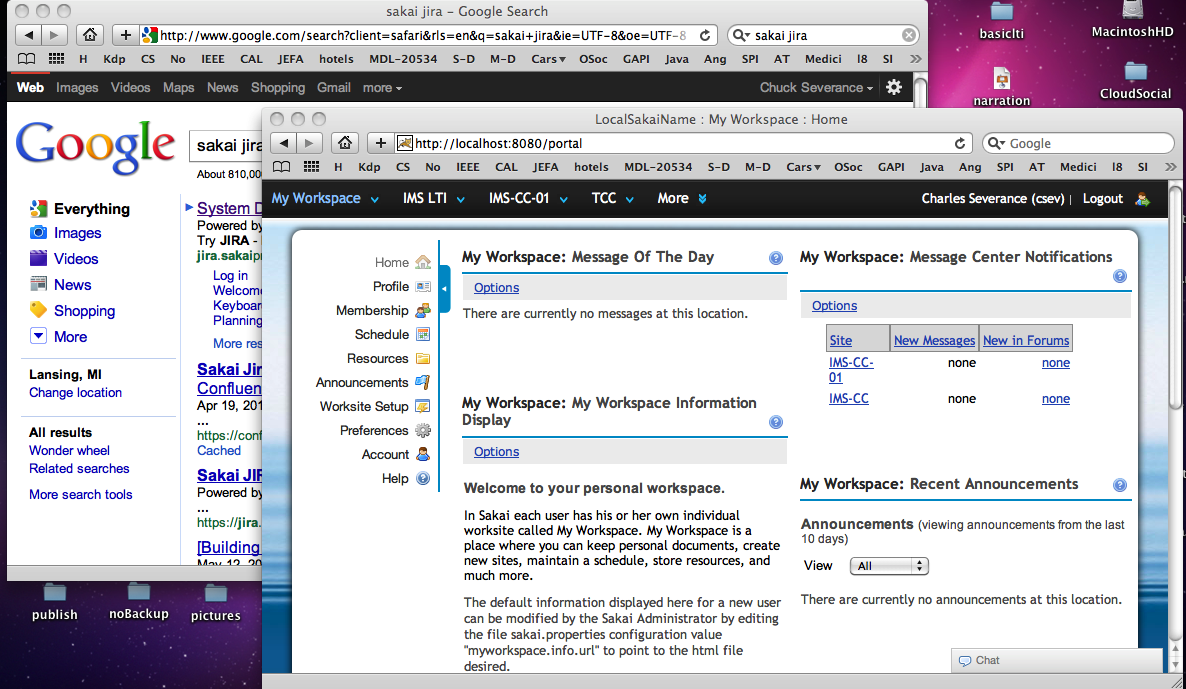
Google Adopts User Interface Design from Sakai 2.9!

Google now has a black top bar with sans-serif white and grey text that looks like Sakai 2.9’s Neo Portal! (Click on image to see full size screenshot).

What is next? Rounded corners and a pool of water background for Google?

I would say that Gonzalo’s glowing blue for the selected item and our speedy-drop-down nav and expando-matic still puts Neo well ahead of Google in terms of UI goodness. I would say that it is good for Google to continue to aspire to UI greatness, using Sakai Neo as its roadmap.

(To be fair) Neo took its look and feel cues from Sakai OAE, and Sakai OAE ripped a lot of its look and feel from Twitter, I think – or perhaps Twitter took its latest look and feel from early OAE work. It is so confusing to keep track of who borrowed ideas from whom.

P.S. But seriously, it is nice to see a bit of convergence in these UI’s serving common purposes. It is all good for the users IMHO.

Reinstalling Boot Camp Partition – Going from Vista to Windows 7 on an iMac

The time had finally come for me to switch my BootCamp partition on my iMac to Windows 7. The Windows Vista was just too unreliable and I heard a lot of good things about Windows 7. But of course you know that once you open things up, things can go wrong and it always takes longer than you expect.

First of course, back up the user data from Windows Vista and get TimeMachine up-to-date in case it all fails. Live and Learn Moment: I should also have rebooted off my Snow Leopard drive, run disk utility and repair/verify my iMac boot partition before starting.

My first instinct wanted to simply insert the Windows 7 disk and reboot and install a fresh install on the existing partition – some day when I am bored, I might try that and see what goes wrong – but this time I figured I would delete and recreate the partition through Boot Camp Assistant on the MacOS side. That seemed like the most upright thing to do.

So first I deleted the Windows Partition in Boot Camp Assistant, worked perfectly. That was the easy part.

Then I wanted to re-create the Windows Partition in Boot Camp Assistant. My first problem is that I followed directions and selected:

Download Windows support software for this Mac

This just does not work (per lots of forum posts) so I properly indicated that I had all of the drivers.

When I got to the part where it was going to re-create the Windows partition, using Boot Camp Assistant and after it took a long time with no explanation of what it was doing I got the following dreaded message:

Bootcamp Partition Error: “Files cannot be moved”

Urg, I just had a partition there – and so there was plenty of free space. At this point, I wish I tried booting my OSX drive and running verify/repair and see if that fixes the problem. I think it might have fixed the problem.

I did some goggling and came up with this discussion forum:

http://forums.macrumors.com/archive/index.php/t-191729.html

This led me to the iDefrag software. It turns out I had purchased iDefrag 1.x back in 2007 and throught it was a pretty cool product – I like nice clean disk space with files that have all their data in one place so I like defraggers. I even had a boot disk that I had saved from long ago in 2007. So I popped the iDefrag disk and booted – it worked, but not all of the options seemed functional.

So I messed around for a while and decided to by the latest iDefrag2. It nicely does not need to make a boot disk. So I rebooted into defrag mode and did a full defray. The drive heated up and so I aimed a fan at the back of my iMac to keep it cool. I did have to adjust the minimum temperature to restart the process to 52 degrees so the drive ranges between 52 and 55 degrees – but with the fan going, I don’t think it stopped for heat after I put the fan behind my iMac.

After defrag completed, I reboot and tried to create the Windows partition using Boot Camp Assistant and again after a long period of time, I got the

Bootcamp Partition Error: “Files cannot be moved”

I was distracted by a little red herring of a band of “red fragmented” files that were left at the end of the drive and I guessed that they might be the problem. So back to defrag and when I redefragged again the files were still there. Then I looked at the files using the iDefrag UI and they were:

/private/tmp/.coriolis-scratch

Then I went into iDefrag in normal Mac OS mode, and the file was not there. Nice. It automatically gets cleaned up when it boots back into Mac OS/X. So that was *not* the problem – I had about 150GB free and empty and perfectly defrayed at the end of my 200GB drive and yet:

Bootcamp Partition Error: “Files cannot be moved”

Aargh. More googling. After I look for a few pages beyond the first few pages, I start to see mentions of “Repair Disk” and “fsck -fy” – then it dawned on me – that long pause when it was partitioning might have been a disk check.

So out comes the Mac OSX disk and boot into Disk Utility. Verify Disk indicates that I *do* have errors on the drive – so I run Repair Disk and fix the errors. Running Verify disk indeed indicates it is now clean.

Rebooting back into Mac OSX and running Boot Camp Assistant – I finally can make a nice 40GB partition and I insert my Windows Vista disk and am feeling pretty happy (having a defrayed boot volume just makes me feel happy in general).

But then as Windows 7 install completes and I am entering my activation key, it keeps claiming my activation key is wrong. DRAT! More Googling. Turns out you can leave the key field blank, finish install, and then activate online. Whew! I blank out the key and installation finishes.

I immediately try to activate Windows 7 using the Windows Activation Tool and after I enter my key and I wait a long time it tells me that my key is upgrade only. I look at the packaging that I got from the UM Computer Showcase where I bought the software and nowhere on the packaging is there any mention of “upgrade”. Ah well.

At this point, I am wondering if I just can buy another key. I did not want to reinstall Vista and then install Windows 7 over top of it and apparently they will not let you present the CD of the older product or the key from the older product. I want a fresh clean install – not with crufty bits hanging around from years earlier. And yes, I had a valid Vista Key.

So I am googling how to upgrade an upgrade key to a real key or perhaps beg Microsoft Support to give me a mulligan on this install.. And then I find this page about how to upgrade without installing Vista:

http://windowssecrets.com/newsletter/get-vista-upgrade-never-pay-full-price/

Oh yeah – you can upgrade over top of an Windows 7 installation (thanks for the loophole Microsoft! – I did not abuse it I just used it) – so I eject the CD and re-insert it and go through the upgrade process for Windows 7 (atop WIndows 7). During the “upgrade install”, it interestingly did a lot of copying of “files, settings, etc” so I was concerned that it was making cruft one way or another.

Abstract: Empowering Teachers With More Pluggable Educational Technology

Tomorrow I will be presenting a talk at the “Teachers Teaching Teachers about Technology” virtual conference.

http://www.4tvirtualcon.com/

Abstract

Teachers are often greatly limited in the educational technology they can use in their classes because it becomes increasingly complex to use on the web software from many different vendors. Students must get a separate account for each new system, teachers need to jump between systems to assess and grade student work and transfer grades between the different systems.

Thorough the IMS Global Learning Consortium (www.imsglobal.org), the marketplace is developing standards that will allow course rosters and roles to be moved from one system to another and for graded to be moved between systems without rewiring hand-copying of data between systems. The new standard is called ‘IMS Learning Tools Interoperability’. For example if your school uses Moodle and you would like to use www.chemvantage.org for Chemistry homework, you can simply ‘plug’ ChemVantage into Moodle and the rest is handled automatically.

This presentation will introduce IMS Learning Tools Interoperability at a very high level and show some demonstrations of it working with Sakai, Moodle, and Blackboard.

Speaker: Dr. Charles Severance
University of Michigan School of Information

http://www.dr-chuck.com/
twitter: @drchuck
Bio/Pictures: http://www.dr-chuck.com/dr-chuck/resume/bio.htm
Slides: http://www.slideshare.net/csev/empowering-teachers-with-more-pluggable-educational-technology