Teaching Four Free Python Courses on Coursera, Reflecting on Specializations

Update: As of January 2017, Coursera has implemented a “pay wall” on the assessments in the Python for Everybody courses. My preference was not to have a paywall but Coursera insisted. As a result, I have made all of the materials and exercises available for free at www.py4e.com – this site teaches Python 3 but the exercises can be done in either Python 2 or Python 3.

Update: As of April 2017, we have unlocked the Capstone (course 5) on Coursera – it is no longer necessary to complete all of the first four courses before joining the capstone.


In interacting with my current students from Programming for Everybody (Python) – (a.k.a. #PR4E), there are clearly a lot of questions about how Specializations work on Coursera.

Specializations are multi-course sequences with a Capstone. All of the courses that make up the specialization except the Capstone remain free. Here are my four free Python courses that cover all the material in my Python for Informatics textbook (now available in English, Spanish, Korean, and Chinese). The first two courses are six weeks long and cover the same material as my 11-week Programming for Everybody (Python) course on Coursera.

You can find all of Colleen van Lent’s free Web Design for Everybody courses here on her instructor page. You can also find all my classes at my Coursera instructor page.

The Specializations and Capstones

The specializations are multi-course sequences that require you to earn and pay for certificates in all of the courses that make up the specialization and then enroll in and pay for the Capstone course. As an example, it costs around $400 to pay for the four courses and capstone certificates for my Python for Everybody specialization. Colleen’s Web Design for Everybody specialization is also around $400. Both specializations have “pay up front” discounts.

A key element of the capstone course is that it is not “new material” – all the material that you need to know is available in the free classes. You are supposed to have already learned the skills in the courses that led up to the capstone. The capstone is more project-oriented with more feedback and a smaller group of students who we know already have pre-requisite information and so are well-prepared to take the capstone. By the time you get to the capstone, you might even know some of the other students in your class. Study groups may have formed and have been functioning for months. Capstones may have industry participation or other benefits.

My Thinking on Specializations and Capstones

When I started with Coursera back in 2012, all I ever dreamed of was to teach one course and have fun with it and engage with people around the world. I chose Internet History, Technology, and Security because I could showcase all my interviews of famous innovators and create a very special course. I wanted to get students who were afraid of technology to the point where they liked technology. This course was very successful with close to 200,000 enrollments since 2012.

I also felt very lucky to be allowed to teach a second course called Programming for Everybody (Python) where I was able to build a dream course that would focus on teaching programming to those who had absolutely no prior experience. PR4E was also a great success, with over 3/4 million students taking the course since 2014. It also was very successfull in meeting my goal of getting people *into* technology even if they were scared or had no experience.

But, from the beginning, there has been a constant demand for more courses. Both online and in my face-to-face office hours around the world there was a constant push for “more courses”. Students did not want to just get a taste and lose their fear, they wanted real skills that they could use to make real changes in their careers.

Moving from “one great course” to “job-applicable skills” is not as easy as it seems on the surface. It requires a willingness to stick to something for more than a few weeks. In college, courses build upon one another – not all courses can be “prerequisite free”.

So if we are to build online activities that begin to move students through 20-30 weeks of course material, there needs to be some structure and some buy in – and an ultimate goal that helps put all the work into some perspective. There needs to be some kind of “graduation” – some kind of light at the end of the tunnel.

Because as you progress through the material in a “curriculum”, the material gets more difficult and the likleyhood of dropout goes up dramatically. So educators build structures to help students make it all the way to the end.

The specializations are that needed structure and the capstone is the light at the end of the tunnel – that graduation – that goal that makes all the effort worthwhile.

And if you imagine that you are going to invest 6-9 months of effort in a sequence of increasingly difficult courses – having to pay for them is a motivational plus in a way. When we think about “paying” for these courses, remember that Coursera has a very active financial aid program that makes sure that we are not blocking access to these courses (including the specialization and capstone) for those unable to pay. For those able to pay, you can pay as you go or pay up front. You can take a course and choose to get the certificate after you know you will succeed in the course.

Conclusion

I personally am 100% committed to making all my courses and material free to everyone. If my goal is to truly “teach everyone” I cannot and will not hide my content behind a paywall.

I think that the approach that Coursera is taking balances free access and pay access in a way that makes sure that all have access to the learning they want. And Coursera and University of Michigan need some way to justify the significant expense in putting out all of this free material. For those who can afford to pay, I hope that you do pay. For those that cannot pay, take a look at financial aid options. And for those who just want to pick and choose courses for a more easy-going pace of professional and personal development, you should be thankful for the effort that Coursera and the University of Michigan have put into specializations over the summer. Because of specializations, the number of free courses available has nearly doubled in the past six months.

It took me three years to get to providing two courses on Coursera. Over the summer, my colleague Colleen van Lent built four completely new free courses on web design and a web design specialization. The pace of creating better ways to learn is accellerating and specializations are just one important part of the mix.

We all fear change – I sure know that I do. But if we know one thing about change it is that the more things change the more things stay the same. I am pretty sure that Coursera now provides more high-quality free courses to the world than the rest of the MOOC providers combined. And we are moving up the value chain from courses that lead to wonderful personal growth to specializations that change your career arc.

Announcing University of Michigan / Coursera Python and Web-Design Specializations

I have been involved with Coursera and MOOCs since early 2012 when I created my Internet History, Technology, and Security #IHTS course on Coursera. That was followed up in 2014 by my Programming for Everybody (Python) #PR4E course. Over the past three years we enrolled nearly 200,000 students in #IHTS and nearly 600,000 students in #PR4E.

Both of these classes are designed as “on-ramps” for students to take as their first foray into technology. The good news is that I think that we were very successful in the pacing and content of both classes so that they were accessible to all students regardless of prior knowledge or experience. But at the end students were always left wanting more advanced material.

So this Fall, we are expanding the Python course into a five-course Specialization called Python for Everybody and adding a whole new specialization taught by my University of Michigan School of Information colleague Colleen van Lent called Web Design for Everybody. We chose the “..for Everybody” names because we are both committed to teaching courses that had no pre-requisites except for a willingness to work and learn.

To transition to the “Python for Everybody” specialization, we have broken the material in the 10-week “Programming for Everybody” course into two six week courses that we now call “Getting Started with Python” and “Python Data Structures”. And to that we add two more six week courses titled “Using Python to Access Web Data” and “Using Databases with Python”. These two new courses will cover Chapters 11-15 in the textbook.

Here are the links to the four courses that now cover the entire Python text book:

Those students who paid for and earned a verified certificate in any of the Programming for Everybody sessions (all the way back to April 2014) can jump right to the third course in the specialization. Your Programming for Everybody verified certificate will be treated the same as earning certificates in each of the first two new courses in the Python for Everybody specialization.

For those students who could not complete the course due to time commitments or other issues, you will be able to re-start at the beginning on the new Coursera learning platform that is much more flexible in terms of deadlines. Courses start every 6-8 weeks, and if you don’t complete the course in one session, you can join the next session and your homework and quizzes follow you from session to session so you don’t have to start over. If you want to work quickly, you can see all the material as soon as the course opens so you can race through as fast as you can go. The advantage of the new platform is that there is a wider range of paths to completing the course successfully.

Live Office Hours

If you have any questions about the courses I have taught or the specializations going forward, Colleen and I will be having live online office hours (more like a question and answer session) on Tuesday September 8, at 12:30 PM Eastern time using a Google Hangout. That is a great time to ask questions of either of us. The URL for the live office hours is:

http://live.dr-chuck.com/

So all in all, it is a super-exciting time for us. Colleen and I have worked all summer to prepare these new courses and we hope you will join us this Fall in one or many of these classes.

Sakai 11 – Skin Contest

(This is taken from a posting to the Sakai mailing lists)

Announcing a Sakai 11 skin contest!

Winner(s) to be announced at the Sakai Virtual Conference – November 4th, 2015.

Description

One of the key features for the next major release of Sakai is responsive design, or better support for small screen sizes like cell phones (aka code name Project Morpheus). Thanks in large part to contributions from NYU, Marist, and Murcia, we have a great UI design to start with. Now we want to take it to the next level! Help us go there!

Come up with your best design, take screenshots, document your rationale for the design, provide details (feel free to use frontify.com, it may help).

Submission process

Working on it. Will have more details in weeks leading up to the conference. But there’s no reason you can’t start working on it today!

Getting started

To get started, it is recommended that you download a copy of Sakai 11 to run on a test server, or at least take a look at our master copy on our nightly server (create an account or use default account “instructor” with password “sakai”). See what we’ve already got, and build from there.

Take into account internationalization issues (the ability to localize Sakai to a geographic location’s cultural and language preferences) and accessibility, so that people with physical limitations are not limited in their use of Sakai. A quick and easy resource to start with is http://webaim.org/resources/contrastchecker/ or http://www.w3.org/TR/WCAG20/.

Come up with your color schemes, come up with any interface changes, consider desktop and mobile screen sizes. Mock up your schemes as images that anyone can access (jpeg, png, tiff, etc).

Caveats

As Sakai continues to evolve and innovate we need to be aware of a number of issues. As mentioned above, internationalization and accessibility are a couple of examples. But we also have maintainability and consistency to consider. A subset of the community actively fixes bugs and maintains tools. We call these folks the Sakai Core team. This team needs to feel comfortable that they can support the code. And we have efforts underway to make Sakai tools have a common look and feel, so that they will be easier to use overall.

So feel to go crazy and wild with your designs. The winner(s) will be based on aesthetic beauty, functionality, and creativity. The Sakai Core team will pick and choose which elements will work best, possibly across several designs, if that makes sense. Also, the Sakai Core team and the Sakai PMC will consider the timeline of Sakai 11 and figure out which skin features will make it into the Sakai 11 timeline and which will need to wait until the next maintenance or major release. For these reasons, 2 or 3 members of the judging panel will be from the Sakai core team.

Judging and Prizes

The judging panel will determine the criteria for the contest winners and the distribution of the prize money. We have donations for the prize money of several hundred dollars which will likely be distributed as Amazon gift cards.

Judges will not be eligible for prize money themselves (in case they want to submit, or collaborate on a submission).

Abstract: The Next Generation of Teaching and Learning Tools

The phrase “learning management system” and the first commercial products in the marketplace emerged from a number of higher education institutions. As these early products were commercialized it was very clear that the LMS market was very lucrative. For the past fifteen years, the ideal product strategy arc seemed to start with higher education, and then expand into corporate education, and later into K12 education. With so much churn due to new entrants, shifts in market share, and market change through acquisition, the mainstream LMS vendors have never succeeded beyond higher education in a serious way. While the LMS market players were distracted fighting for market share, vendors like Edmodo (55 Million users) and Schoology quietly evolved very successful K12 offerings. The structure of K12 market is quite different than higher education, so these vendors developed completely different business models and software architectures. Is there a way forward that takes the best of these two independently developed approaches and blends them together? What can the two halves of the marketplace learn from each other? If we were to develop a ground-up learning environment, could it be built to satisfy both sub-markets? Could open source products, open content, and open communities, be a significant part of the founding vision of this next generation market for next generation software to help teachers and learners?

Abstract: Standards to Enable an Open Learning Ecosystem

This is an abstract for an upcoming talk I will be giving this Fall at NERCOMP. It is just a draft.

The concept of a Learning Management System is nearly 20 years old. For the most part, modern-day Learning Management Systems are simply well-developed versions of those first learning systems developed at universities and commercialized through companies like Blackboard, WebCT, and Angel. Since the early LMS systems were developed for a single organization and developed as a single application, it was natural for them to keep adding more functionality to that single application. Vendors like WebCT and Blackboard added proprietary formal expansion points to their LMS systems like Building Blocks and PowerLinks. In 2010, the IMS Learning Tools Interoperability Specification was introduced and provided a basic expansion point across the whole industry. LTI greatly expanded the number of applications that could be integrated into an LMS – but those integrations were naturally limited because of the simplicity of LTI 1.1. In this talk we will look at the standards activities over the past five years that have been laying the groundwork to move from simple plug-in integrations to a learning ecosystem where the LMS is just one part of that ecosystem. We will look at the work that has been done and what is left to do to deliver an open learning ecosystem.

How much Freon does a General Motors 3800 AC system hold

Since I Googled for a very long time and could not find the answer to this super simple question I figured I would help owners of Chevrolet, Buick, Oldsmobie cars with the venerable 3.8 litre engine when they are recharging their AC.

Most of the systems take 2.2 pounds of freon. There is a nice little sticker on your car that tells you how much freon to add. So make sure to check the sticker – it will probably say 2.2 pounds.

How is Sakai faring in the face of competition from Canvas?

(This was originally an email sent to the Sakai developer list)

A member of an institution that uses Sakai recently heard an interesting comment from a Canvas LMS representative:

“Sakai is such a cool concept but I do wonder where it will end up in the future as most its founding schools (and the schools putting resources into developing it) have now left and come to Canvas (for example, University of Indiana, University of Michigan, Stanford University).”

I thought this deserved a public reply.

My first observation is that a salesperson spreading FUD (fear, uncertainty and doubt) about Sakai suggests to me that they may not have a strong positive feeling about their own product. Most salespeople will tell you that the best thing to do is focus on what makes your product strong without even talking about other products.

That aside, let me give my response to your question. Each year I do some analytics on the developer list activity:

This chart shows a trend that at this point is about five years old. In the beginning early adopters such as Michigan, Indiana, Stanford, and Cambridge were pulling a lot of load as the product was literally being built and rebuilt. Also in the earliest years, new schools were adopting Sakai continuously so a lot of the e-mail activity was helping new schools.

The early lead schools dropped in activity in 2009. In 2009 Michigan was still the #1 participant in the dev list but a lot of increased participation was also coming from companies like LongSight and Unicon; participation from the other commercial affiliates (often using gmail.com addresses) was increasing as well.

In some ways, 2009-2011 was Sakai’s period of greatest risk as a community. A lot of things were trending downward and near the end of 2011 there was a very good chance that Sakai 2.9 would never see the light of day and it would be “last one out turn off the lights”.

The future of Sakai was originally planned to be a ground-up rewrite known as Sakai 3, however, this didn’t work out as planned and instead a brand new product known as Apereo Open Academic Environment (OAE) was developed. (OAE became a new type of learning platform based on social networking principles: sharing, co-editing, discovery and commenting upon content.)

But in 2012-13, there was a big turnaround with a redesigned Sakai 2.9 which included the brand new Lesson Builder tool.

Following that came consolidation with the tool-rich and innovative Sakai 10. Those who were still in the community put in a lot of effort – Michigan and Longsight were in really strong leadership positions. Other schools like Rutgers, NYU, Columbia, Duke, UNC, and others don’t show up in this dev list graph but they provided much of the money and developer talent to get us through Sakai 2.9 and Sakai 10.

Interestingly in the 2013-14 timeframe we see a couple of factors at work. First the 2102-13 sprint was over – we had Sakai 10. Here is a SlideShare I did that celebrated that moment:

The upcoming Sakai 11 release is the most important release for several years, however, aside from the addition of a responsive design, it is unique in that we are not expanding functionality as much as in the past: we are actually removing more code than we are adding and doing a bunch of UI rework in tools like Lessons, Gradebook and Portal. These more design-oriented activities tend not to cause lots of traffic on the dev lists.

Another interesting trend is that now that we have weekly developer team and teaching and learning meetings with up to 20 people regularly attending: the community is coordinating verbally and collectively in these meetings therefore less email is needed.

As we emerge into 2015, activity and commitment is very strong. The commercial affiliates (large and small) are a very important part of the community. Indiana and Stanford are quite low compared to earlier levels of participation. But something interesting is happening – some of the code that was traditionally the exclusive domain of Stanford or Indiana is now being maintained by the whole community. The interesting result is that the pace of development in those areas of the code base is increasing because now the whole community can move the code forward.

More community members are stepping forward to help because they know that they no longer assume that Indiana, Stanford and Co. will pick up the slack.

During 2011-2014 as the founding institutions slowly backed away, patches and bug fixes started to pile up. Now that the community has inherited the code-base and collective responsibility, the outstanding issues are rapidly being addressed. This is not meant as a criticism of the original partners, they built the core codebase that we all have and without them, we would have nothing. We are very much in their debt.

Looking forward, our community is solid and making lots of progress every single week. We have the luxury of putting a lot of effort into the UI and catching up with applying a backlog of local improvements from places like Oxford, Dayton, Columbia, NYU, Duke, Notre Dame, and UNC. These improvements are enriching our product. In addition, schools like Valencia, Murcia, Rutgers, and UCT are continuing to make strong direct contributions to the code base.

As we see Sakai 11 coming out with its new Morpheus responsive mobile-friendly portal and all of the user interface and performance improvements, I can see why Canvas sales people might be getting a little nervous and use a bit of FUD to try to scare you to switch now.

Thanks to Adam Marshall of Oxford for his editing help on rewording this from an email to a blog post.

Annoucing the (very early) Sakai – Tsugi Bridge

In my previous post, I announced a Java implementation of my Tsugi library. Java Tsugi has as its goal to allow externally hosted LTI applications to be quickly developed and hosted.

But there is more….

I have been long positing that Tsugi would be a way to build portable applications that ran in any Java framework. Take a look at this slide set starting at slide 24 through the end. Pay particular attention to slide 28.

I claim that the same Tsugi application can run standalone in a Tomcat or in a Sakai-provisioned Tomcat as a Sakai tool with zero code changes. I see Tsugi as a great way to build the next generation of Sakai tools like XWiki – we can build an LTI capable XWiki to plug into Sakai or any other LMS.

I have made some really initial steps in this repo:

https://github.com/csev/tsugi-sakai

This is contains a Sakai implementation of the Tsugi APIs so that the Tsugi Java Servlet can be provisioned run in a Sakai Tomcat. The implementation is currently empty – but I have worked out the class loader issues that allow me to provision a Tsugi servlet with a different implementation without changing the servlet.

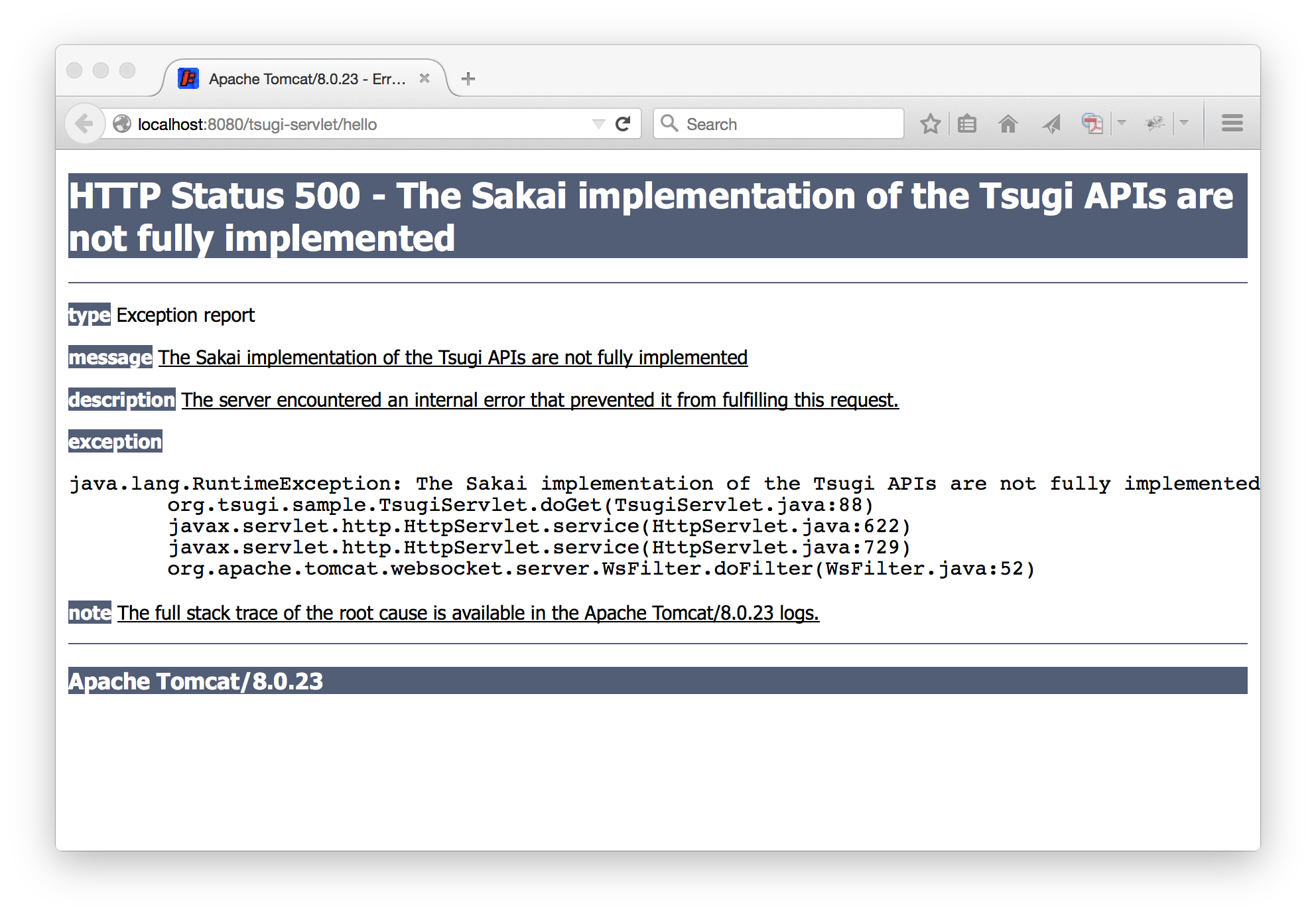
So this is very much a start – the README.md has a lot of steps – and at the end all you get is a 500 error as shown below – but it does show how we can eventually connect the Tsugi and Sakai worlds.

2015-06-15-Tsugi-Sakai-500

Annoucing the Tsugi Java Library for Building Interoperable Learning Applications

I have been focused on laying the technical groundwork for interoperable learning applications for the past ten years. Through my work on Sakai and IMS I have tried to help move the entire industry forward to enable innovative teaching and learning applications. While we have made great progress, there is much to do. My recent “State of Sakai” talk at the Apereo Conference alludes to the kind of work we still need to do.

I have been exploring the space where applications are both portable and interoperable through my Tsugi. Over the past year I have spent more time on Tsugi than I have on Sakai because I think that exploring future architecture is a very high priority task.

Last week I gave a workshop at the Apereo 2015 conference on Building Applications using IMS Learning Tools Interoperability using my PHP Tsugi. While the workshop went very well, it was clear that the folks that needed to build interoperable applications *right now* were not interested in programming in PHP. Also, I am well into my Summer of Sakai 2015 effort working with a number of students over the summer and it is clear that it is simply too difficult to teach new developers how to write Sakai applications.

All of this was a “perfect storm” that motivated me to drop everything and put in an all-out effort to port my Tsugi library to Java in the past week.

Announcing Tsugi Java 0.0.1

It has been a pretty crazy week – I coded day and night and pretty much ignored my inbox – but I am pretty pleased with the results. While Java Tsugi still needs some work – it is already quite competent to build LTI 1.0 applications in Java – and they feel very clean and elegant. Here are some documents:

This will continue to move and evolve but it is in good enough shape to share with others to start getting broader input.

I also recorded a short introductory video about Tsugi Java:

Conclusion

This is a great start and there is much still to do for Java Tsugi. I am hoping that others will help move this effort forwards and contribute to the project. For the next few weeks, I now need to sprint on finishing up a bunch of things for the Sakai 11 code freeze.

Please feel free to let me know if you have any questions or comments.

Notes from my Tsugi Workshop at Apereo15

These are my notes for my LTI/Tsugi Workshop May 31, 2015 at Open Apereo 2015.

If you want to get a head start on the workshop (and save some bandwidth) follow these instructions:

https://github.com/csev/tsugi/blob/master/docs/INSTALL.md

You will install git, a PHP/MySQL environment, and then check out Tsugi, and install Tsugi.

If you were only going to do one thing before the workshop, download MAMP or XAMPP so we don’t wait too long for downloads according to this:

http://www.php-intro.com/install.php

I will bring pre-downloaded files for both pieces of software in the morning if you don’t get to it.

After we play with the PHP version, we can play with the emerging Java Tsugi version. Make sure you have Java 8 installed on your computer and take a look at these two github sites:

https://github.com/csev/tsugi-j-lib

https://github.com/csev/tsugi-j-sample

See you in the morning.